
News and Updates
Search News
-
2026 Editions
2025 Editions
2024 Editions
Newsletter Archive
Reminder to submit Hospital/ Site Overview data!
This is a reminder to submit your NACEL Hospital/ Site Overview data, data collection is open until Monday 30th September 2024.
This is a reminder to submit your NACEL Hospital/ Site Overview data, data collection is open until Monday 30th September 2024.
Download the H/S Overview data specification
Please continue to submit your Case Note Review data and continue to collect responses for the Quality Survey. Data collection for both audit elements is open until 31st December 2024.
August Participation Update
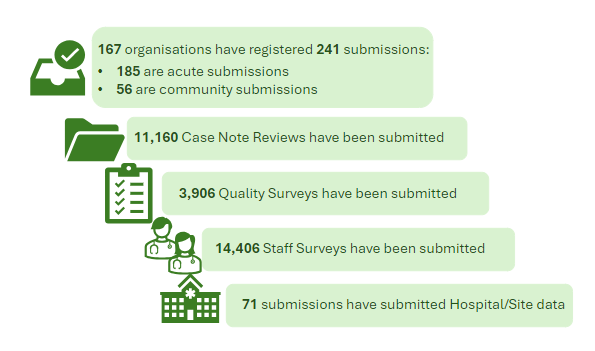
Thank you for your continued participation in NACEL 2024. Data collection for NACEL opened on January 1st 2024 and participation rates continue to increase. See an update on data submission figures below.
Thank you for your continued participation in NACEL 2024. Data collection for NACEL opened on January 1st 2024 and participation rates continue to increase. See an update on data submission figures below.
Sign up for the next NACEL Quality Improvement webinar
The webinar will take place on Thursday 17th October, 1pm-2pm via MS Teams. The topic is to be confirmed.
Sign up for the next NACEL Quality Improvement webinar! The webinar will take place on Thursday 17th October, 1pm-2pm via MS Teams. The topic is to be confirmed.
The last Quality Improvement webinar was held on 25th July. The webinar looked at how to get started with QI work, and focused on the needs of loved ones and others close to the person who has died. To access the event slides and recording please click on the button below:
Reminder for Site Admins to check pending Data and Improvement Tool users
Reminder for DIT Site Admin users to check their pending users and accept/decline requests.
Reminder for DIT Site Admin users to check their pending users and accept/decline requests.
Members of your team will not have access to the DIT until the Site Admin has approved their registration request. The NACEL Team will also be reaching out directly in the coming weeks to remind Site Admins to do this.
Pending users can be found under the 'Admin' tab after logging in, or can be viewed by clicking here.